
Sehr geehrte Kunden,
eine neue Möglichkeit für ein grafisches Tool auf der Shop-Startseite (aber auch in HTML-Includes usw..), welches beim Projekt www.grappa.de zum ersten mal zum Einsatz kam. Ein weiteres Beispiel finden Sie auf tympanus.net/Tutorials/HoverSlideEffect/! Im Grunde wieder eines der typischen jQuery-Features, die sich jeder von Ihnen selbst im Shop einbinden kann.
Interessant wie wir finden, weil es noch nicht so oft im Netz zu sehen ist. Andere Sachen wie ein 3D-Karussell usw. können wir ja alle schon nicht mehr sehen
Klick für Live-Ansicht:
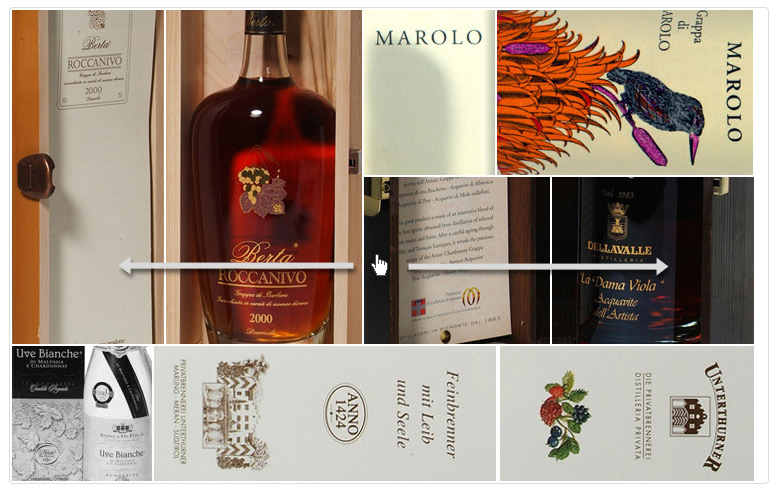
Hier beschreiben wir kurz was nötig ist, das selbst zu erstellen:
Zunächst muss jQuery im Shop schon im Einsatz sein. Bei vielen Shops haben wir es im Hintergrund optimiert (sprich gz-komprimiert) eingebunden. Andere sehen die Einbindung über Sonstiges > Sonstige Einstellungen im Feld "Javascript_Head:".
Für dieses Beispiel aus www.grappa.de benötigt man 15 Bilder. Jeweils 3 einer bestimmten Größe, die man natürlich im CSS selbst beeinflussen kann. Jedes Bild kann man auch einzeln verlinken.
Über Layout > Startseite > Infogruppen stellt man in einem Grafik/Text Infotyp einen folgenden Code ein:
Die Bilder img/area1_1.jpg, img/area1_2.jpg usw. sind im Code leicht zu erkennen. Die Konfiguration auf die eigenen Bedürfnisse also reine Fleißarbeit. Da hierzu quasi 15 Banner nötig sind, ist die Umsetzung bei uns mit ca. 2-3 Stunden (á 70€) recht aufwendig. Kann aber jederzeit beauftrag werden.
Im CSS gehört dann noch dieser Block hinein:
Im CSS lassen sich z.B. die Größe der Bilder, bzw. der gesamten Anzeige an das eigene Design anpassen.
Viel weiter möchte ich an dieser Stelle nicht ausholen und verweise auf die Doku auf tympanus.net/codrops/2010/11/16/hover-slide-effect/ !
eine neue Möglichkeit für ein grafisches Tool auf der Shop-Startseite (aber auch in HTML-Includes usw..), welches beim Projekt www.grappa.de zum ersten mal zum Einsatz kam. Ein weiteres Beispiel finden Sie auf tympanus.net/Tutorials/HoverSlideEffect/! Im Grunde wieder eines der typischen jQuery-Features, die sich jeder von Ihnen selbst im Shop einbinden kann.
Interessant wie wir finden, weil es noch nicht so oft im Netz zu sehen ist. Andere Sachen wie ein 3D-Karussell usw. können wir ja alle schon nicht mehr sehen
Klick für Live-Ansicht:
Hier beschreiben wir kurz was nötig ist, das selbst zu erstellen:
Zunächst muss jQuery im Shop schon im Einsatz sein. Bei vielen Shops haben wir es im Hintergrund optimiert (sprich gz-komprimiert) eingebunden. Andere sehen die Einbindung über Sonstiges > Sonstige Einstellungen im Feld "Javascript_Head:".
Für dieses Beispiel aus www.grappa.de benötigt man 15 Bilder. Jeweils 3 einer bestimmten Größe, die man natürlich im CSS selbst beeinflussen kann. Jedes Bild kann man auch einzeln verlinken.
Über Layout > Startseite > Infogruppen stellt man in einem Grafik/Text Infotyp einen folgenden Code ein:
<div style="-webkit-border-radius: 4px;-moz-border-radius: 4px;border-radius: 4px;border: 1px solid #DDD;">
<div id="hs_container" class="hs_container">
<div class="hs_area hs_area1">
<img src="img/area1_1.jpg" onclick="location='s01.php?pp=aa&bnr=30023256';" alt="" class="hs_visible">
<img src="img/area1_2.jpg" onclick="location='s01.php?pp=aa&bnr=30019102';" alt="">
<img src="img/area1_3.jpg" onclick="location='s01.php?pp=aa&bnr=30019101';" alt="">
</div><div class="hs_area hs_area2">
<img src="img/area2_1.jpg" onclick="location='s01.php?pp=aa&bnr=30050086';" alt="" class="hs_visible">
<img src="img/area2_2.jpg" onclick="location='s01.php?pp=aa&bnr=30011000';" alt="">
<img src="img/area2_3.jpg" onclick="location='s01.php?pp=aa&bnr=30023241';" alt="">
</div><div class="hs_area hs_area3">
<img src="img/area3_1.jpg" onclick="location='s01.php?pp=aa&bnr=30019103';" alt="" class="hs_visible">
<img src="img/area3_2.jpg" onclick="location='s01.php?pp=aa&bnr=30019504';" alt="">
<img src="img/area3_3.jpg" onclick="location='s01.php?pp=aa&bnr=30019513';" alt="">
</div><div class="hs_area hs_area4">
<img src="img/area4_1.jpg" onclick="location='s01.php?pp=aa&bnr=30013000';" alt="" class="hs_visible">
<img src="img/area4_2.jpg" onclick="location='s01.php?pp=aa&bnr=30010006';" alt="">
<img src="img/area4_3.jpg" onclick="location='s01.php?pp=aa&bnr=30019002';" alt="">
</div><div class="hs_area hs_area5">
<img src="img/area5_1.jpg" onclick="location='s01.php?pp=aa&bnr=30010004';" alt="" class="hs_visible">
<img src="img/area5_2.jpg" onclick="location='s01.php?pp=aa&bnr=30016000';" alt="">
<img src="img/area5_3.jpg" onclick="location='s01.php?pp=aa&bnr=30013050';" alt="">
</div></div></div><script type="text/javascript">
$(function() {
var animations= ['right','left','top','bottom','rightFade','leftFade','topFade','bottomFade'];var total_anim= animations.length;var easeType='swing';var animSpeed=450;var $hs_container= $('#hs_container');var $hs_areas= $hs_container.find('.hs_area');$hs_images = $hs_container.find('img');var total_images = $hs_images.length;var cnt = 0;
$hs_images.each(function(){var $this = $(this);
$('<img/>').load(function(){++cnt;
if(cnt == total_images){$hs_areas.each(function(){var $area = $(this);
$area.data('over',true).bind('mouseenter',function(){
if($area.data('over')){$area.data('over',false);var total= $area.children().length;var $current = $area.find('img:visible');var idx_current = $current.index();
var $next= (idx_current == total-1) ? $area.children(':first') : $current.next();$next.show();
var anim= animations[Math.floor(Math.random()*total_anim)];switch(anim){case 'right':$current.animate({'left':$current.width()+'px'},
animSpeed,easeType,
function(){$current.hide().css({'z-index': '1','left': '0px'});$next.css('z-index','9999');$area.data('over',true);});
break;
case 'left': $current.animate({'left':-$current.width()+'px'},
animSpeed,easeType,function(){$current.hide().css({'z-index': '1','left': '0px'});
$next.css('z-index','9999');$area.data('over',true);});
break;
case 'top': $current.animate({'top':-$current.height()+'px'},
animSpeed,
easeType,
function(){$current.hide().css({'z-index': '1','top': '0px'});
$next.css('z-index','9999');
$area.data('over',true);
});
break;
case 'bottom': $current.animate({'top':$current.height()+'px'},
animSpeed,
easeType,
function(){
$current.hide().css({
'z-index': '1',
'top': '0px'
});
$next.css('z-index','9999');
$area.data('over',true);
});
break;
case 'rightFade':
$current.animate({
'left':$current.width()+'px',
'opacity':'0'
},
animSpeed,
easeType,
function(){
$current.hide().css({
'z-index': '1',
'left': '0px',
'opacity': '1'
});
$next.css('z-index','9999');
$area.data('over',true);
});
break;
case 'leftFade':
$current.animate({
'left':-$current.width()+'px','opacity':'0'
},
animSpeed,
easeType,
function(){
$current.hide().css({
'z-index': '1',
'left': '0px',
'opacity': '1'
});
$next.css('z-index','9999');
$area.data('over',true);
});
break;
case 'topFade':
$current.animate({
'top':-$current.height()+'px',
'opacity':'0'
},
animSpeed,
easeType,
function(){
$current.hide().css({
'z-index': '1',
'top': '0px',
'opacity': '1'
});
$next.css('z-index','9999');
$area.data('over',true);
});
break;
case 'bottomFade':
$current.animate({
'top':$current.height()+'px',
'opacity':'0'
},
animSpeed,
easeType,
function(){
$current.hide().css({
'z-index': '1',
'top': '0px',
'opacity': '1'
});
$next.css('z-index','9999');
$area.data('over',true);
});
break;
default:
$current.animate({
'left':-$current.width()+'px'
},
animSpeed,
easeType,
function(){
$current.hide().css({
'z-index': '1',
'left': '0px'
});
$next.css('z-index','9999');
$area.data('over',true);
});
break;
}
}
});
});
}
}).attr('src',$this.attr('src'));
});
});
</script>
<div id="hs_container" class="hs_container">
<div class="hs_area hs_area1">
<img src="img/area1_1.jpg" onclick="location='s01.php?pp=aa&bnr=30023256';" alt="" class="hs_visible">
<img src="img/area1_2.jpg" onclick="location='s01.php?pp=aa&bnr=30019102';" alt="">
<img src="img/area1_3.jpg" onclick="location='s01.php?pp=aa&bnr=30019101';" alt="">
</div><div class="hs_area hs_area2">
<img src="img/area2_1.jpg" onclick="location='s01.php?pp=aa&bnr=30050086';" alt="" class="hs_visible">
<img src="img/area2_2.jpg" onclick="location='s01.php?pp=aa&bnr=30011000';" alt="">
<img src="img/area2_3.jpg" onclick="location='s01.php?pp=aa&bnr=30023241';" alt="">
</div><div class="hs_area hs_area3">
<img src="img/area3_1.jpg" onclick="location='s01.php?pp=aa&bnr=30019103';" alt="" class="hs_visible">
<img src="img/area3_2.jpg" onclick="location='s01.php?pp=aa&bnr=30019504';" alt="">
<img src="img/area3_3.jpg" onclick="location='s01.php?pp=aa&bnr=30019513';" alt="">
</div><div class="hs_area hs_area4">
<img src="img/area4_1.jpg" onclick="location='s01.php?pp=aa&bnr=30013000';" alt="" class="hs_visible">
<img src="img/area4_2.jpg" onclick="location='s01.php?pp=aa&bnr=30010006';" alt="">
<img src="img/area4_3.jpg" onclick="location='s01.php?pp=aa&bnr=30019002';" alt="">
</div><div class="hs_area hs_area5">
<img src="img/area5_1.jpg" onclick="location='s01.php?pp=aa&bnr=30010004';" alt="" class="hs_visible">
<img src="img/area5_2.jpg" onclick="location='s01.php?pp=aa&bnr=30016000';" alt="">
<img src="img/area5_3.jpg" onclick="location='s01.php?pp=aa&bnr=30013050';" alt="">
</div></div></div><script type="text/javascript">
$(function() {
var animations= ['right','left','top','bottom','rightFade','leftFade','topFade','bottomFade'];var total_anim= animations.length;var easeType='swing';var animSpeed=450;var $hs_container= $('#hs_container');var $hs_areas= $hs_container.find('.hs_area');$hs_images = $hs_container.find('img');var total_images = $hs_images.length;var cnt = 0;
$hs_images.each(function(){var $this = $(this);
$('<img/>').load(function(){++cnt;
if(cnt == total_images){$hs_areas.each(function(){var $area = $(this);
$area.data('over',true).bind('mouseenter',function(){
if($area.data('over')){$area.data('over',false);var total= $area.children().length;var $current = $area.find('img:visible');var idx_current = $current.index();
var $next= (idx_current == total-1) ? $area.children(':first') : $current.next();$next.show();
var anim= animations[Math.floor(Math.random()*total_anim)];switch(anim){case 'right':$current.animate({'left':$current.width()+'px'},
animSpeed,easeType,
function(){$current.hide().css({'z-index': '1','left': '0px'});$next.css('z-index','9999');$area.data('over',true);});
break;
case 'left': $current.animate({'left':-$current.width()+'px'},
animSpeed,easeType,function(){$current.hide().css({'z-index': '1','left': '0px'});
$next.css('z-index','9999');$area.data('over',true);});
break;
case 'top': $current.animate({'top':-$current.height()+'px'},
animSpeed,
easeType,
function(){$current.hide().css({'z-index': '1','top': '0px'});
$next.css('z-index','9999');
$area.data('over',true);
});
break;
case 'bottom': $current.animate({'top':$current.height()+'px'},
animSpeed,
easeType,
function(){
$current.hide().css({
'z-index': '1',
'top': '0px'
});
$next.css('z-index','9999');
$area.data('over',true);
});
break;
case 'rightFade':
$current.animate({
'left':$current.width()+'px',
'opacity':'0'
},
animSpeed,
easeType,
function(){
$current.hide().css({
'z-index': '1',
'left': '0px',
'opacity': '1'
});
$next.css('z-index','9999');
$area.data('over',true);
});
break;
case 'leftFade':
$current.animate({
'left':-$current.width()+'px','opacity':'0'
},
animSpeed,
easeType,
function(){
$current.hide().css({
'z-index': '1',
'left': '0px',
'opacity': '1'
});
$next.css('z-index','9999');
$area.data('over',true);
});
break;
case 'topFade':
$current.animate({
'top':-$current.height()+'px',
'opacity':'0'
},
animSpeed,
easeType,
function(){
$current.hide().css({
'z-index': '1',
'top': '0px',
'opacity': '1'
});
$next.css('z-index','9999');
$area.data('over',true);
});
break;
case 'bottomFade':
$current.animate({
'top':$current.height()+'px',
'opacity':'0'
},
animSpeed,
easeType,
function(){
$current.hide().css({
'z-index': '1',
'top': '0px',
'opacity': '1'
});
$next.css('z-index','9999');
$area.data('over',true);
});
break;
default:
$current.animate({
'left':-$current.width()+'px'
},
animSpeed,
easeType,
function(){
$current.hide().css({
'z-index': '1',
'left': '0px'
});
$next.css('z-index','9999');
$area.data('over',true);
});
break;
}
}
});
});
}
}).attr('src',$this.attr('src'));
});
});
</script>
Die Bilder img/area1_1.jpg, img/area1_2.jpg usw. sind im Code leicht zu erkennen. Die Konfiguration auf die eigenen Bedürfnisse also reine Fleißarbeit. Da hierzu quasi 15 Banner nötig sind, ist die Umsetzung bei uns mit ca. 2-3 Stunden (á 70€) recht aufwendig. Kann aber jederzeit beauftrag werden.
Im CSS gehört dann noch dieser Block hinein:
.hs_container{position:relative;width:742px;height:471px;overflow:hidden;clear:both;margin:2px;cursor:pointer;}
.hs_container .hs_area{position:absolute;overflow:hidden;}
.hs_area img{position:absolute;top:0px;left:0px;display:none;}
.hs_area img.hs_visible{display:block;z-index:9999;}
.hs_area1{border-right:2px solid #fff;}
.hs_area4, .hs_area5{border-top:2px solid #fff;}
.hs_area4{border-right:2px solid #fff;}
.hs_area3{border-top:2px solid #fff;}
.hs_area1{width:350px;height:334px;top:0px;left:0px;}
.hs_area2{width:390px;height:165px;top:0px;left:352px;}
.hs_area3{width:390px;height:167px;top:165px;left:352px;}
.hs_area4{width:140px;height:135px;top:334px;left:0px;}
.hs_area5{width:600px;height:135px;top:334px;left:142px;}
.hs_container .hs_area{position:absolute;overflow:hidden;}
.hs_area img{position:absolute;top:0px;left:0px;display:none;}
.hs_area img.hs_visible{display:block;z-index:9999;}
.hs_area1{border-right:2px solid #fff;}
.hs_area4, .hs_area5{border-top:2px solid #fff;}
.hs_area4{border-right:2px solid #fff;}
.hs_area3{border-top:2px solid #fff;}
.hs_area1{width:350px;height:334px;top:0px;left:0px;}
.hs_area2{width:390px;height:165px;top:0px;left:352px;}
.hs_area3{width:390px;height:167px;top:165px;left:352px;}
.hs_area4{width:140px;height:135px;top:334px;left:0px;}
.hs_area5{width:600px;height:135px;top:334px;left:142px;}
Im CSS lassen sich z.B. die Größe der Bilder, bzw. der gesamten Anzeige an das eigene Design anpassen.
Viel weiter möchte ich an dieser Stelle nicht ausholen und verweise auf die Doku auf tympanus.net/codrops/2010/11/16/hover-slide-effect/ !