
Sehr geehrte Kunden,
wir haben soeben das CSS für die Eingabemaske der B+S Kreditkarte in unserer Auslieferungsversion auf den neusten Stand gebracht und bitten Sie dies bei sich im Shop ebenso einzustellen.
Beim neusten IE und dem Chrome Browser war mit dem alten CSS das Eingabefeld für die Kreditkarte zu kurz, so dass z.B. beim IE der Besucher die letzte (16te) Ziffer nicht sehen konnte.
Nach dem Update sollte dann die Maske so sauber aussehen:
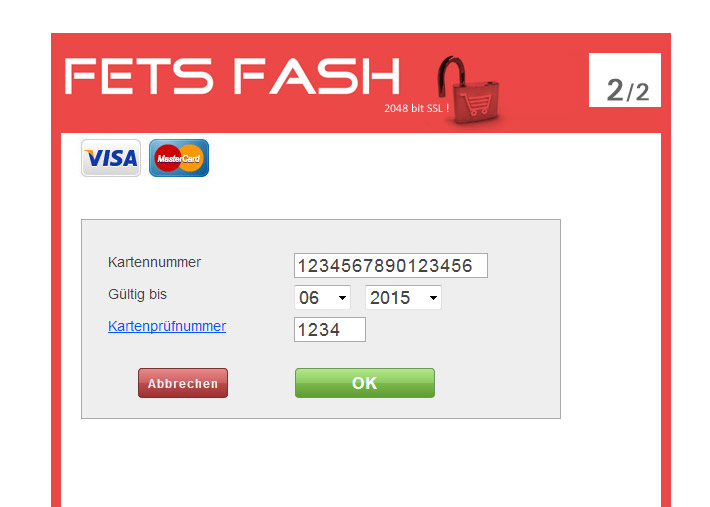
Wenn Ihre Installation schon was älter ist, dann waren auch die Buttons einfacher gestaltet und auch nicht perfekt in der Flucht positioniert. Das alles ist mit dem neuen CSS auch verbessert.
Wie ändere ich das CSS?
Wirklich sehr einfach. Den folgenden Code bitte heraus kopieren und über Icon Warenkorn > B+S Card > Pflege CSS hinein kopieren und speichern. Das war es dann schon. Zur Vorsicht am besten im Frontend dann noch kurz einloggen und die Maske vom Layout her überprüfen.
wir haben soeben das CSS für die Eingabemaske der B+S Kreditkarte in unserer Auslieferungsversion auf den neusten Stand gebracht und bitten Sie dies bei sich im Shop ebenso einzustellen.
Beim neusten IE und dem Chrome Browser war mit dem alten CSS das Eingabefeld für die Kreditkarte zu kurz, so dass z.B. beim IE der Besucher die letzte (16te) Ziffer nicht sehen konnte.
Nach dem Update sollte dann die Maske so sauber aussehen:
Wenn Ihre Installation schon was älter ist, dann waren auch die Buttons einfacher gestaltet und auch nicht perfekt in der Flucht positioniert. Das alles ist mit dem neuen CSS auch verbessert.
Wie ändere ich das CSS?
Wirklich sehr einfach. Den folgenden Code bitte heraus kopieren und über Icon Warenkorn > B+S Card > Pflege CSS hinein kopieren und speichern. Das war es dann schon. Zur Vorsicht am besten im Frontend dann noch kurz einloggen und die Maske vom Layout her überprüfen.
body, img, form, input.submit {padding : 0px;margin : 0px;border : 0px;}
body, img, input {font-family : helvetica, "Liberation Sans", Arial;font-size : 12px;line-height : 16px;color : #444444;}
body {background-color:#FFFFFF;}
select, option {font-size:18px; color:#444444;margin-right:10px;}
a, a:link, a:visited, a:hover, a:active, a:focus {color : #0055ff;}
/* settings for cvc help popup */
body.popup {background : #ffffff;margin : 12px;}
body.popup div.pageheading {font-size : 17px;line-height : 36px;font-weight : bold;}
body.popup div.section div.heading {margin-top : 12px;line-height : 24px;font-weight : bold;}
/* settings for regular form service window */
#bound {width:500px;min-height:500px;}
* html * #bound {height : 600px;}/* IE6 only match */
#topleft, #middleleft, #bottomleft {clear : left;}
#topleft, #topcenter, #topright , #bottomleft, #bottomcenter, #bottomright , #heading, #messagebox, div.panel , input.submit {background-color:#FFFFFF;}
#middleleft, #middlecenter, #middleright {background-color:#FFFFFF;}
#topleft, #topcenter, #topright {height : 144px;}
#content {margin-left:20px;min-height : 192px;border: 1px solid #AAAAAA;background-color:#EEEEEE;}
* html * #content {height : 192px;}/* IE6 only match */
#bottomleft, #bottomcenter, #bottomright {height : 64px;}
#topcenter, #middlecenter, #bottomcenter {margin-right : 0px;}/* width of right column */
#topright, #middleright, #bottomright {margin-left:0px;}/* width of left column */
#topleft {background-position:left 0px;}
#topcenter {background:url("https://shopserver8.de/demoshop/img/bs.jpg") #FFFFFF repeat-x;width:600px;}
#topright {background-position:right 0px;}
#middleleft {background-position:left 0px;}
#middlecenter {background-position:0px 0px;}
#middleright {background-position:right 0px;}
#bottomleft {background-position:left bottom;}
#bottomcenter {background-position:0px bottom;}
#bottomright {background-position:right bottom;}
#header {height:80px;display:none;}
#header img {float : left;margin-right : 17px;}
#heading, input.submit {font-weight : bold;color : #444444;}
#heading {background-position : -48px -208px;}
#heading div, div.panel div {display : inline; float : left; margin-left : 16px; padding-top :7px;}/* fix IE6 double margin bug */
#heading, div.panel {width : 464px;}
#heading ,div.panel {height : 32px;}
#messagebox {height : 80px;background-position : -48px -320px;}
#messagebox div {padding-top : 16px;margin-right : 32px;margin-left : 80px;}
#messagebox.error {color : #f0f0f0;background-color : #F78787;background-position: -48px -240px;}
div.panel {overflow : hidden;background-position : -48px -400px;background-color:#EEEEEE;}
div.panel.error {color : #f0f0f0;background-color : #F78787;background-position: -48px -432px;}
div.error div.message {margin-left : 36px;}
div.panel div.caption {width : 160px;}
div.panel div.value {width : 256px;}
div.panel div.caption, div.panel div.value {overflow : hidden;}
form, #buttons {margin-top : 16px;padding:10px;}
div.panel div.value input {font-size:18px;letter-spacing:1px;height:21px;line-height:21px;border:1px solid #AAAAAA;text-indent:1px;}
input.submit {vertical-align:top;height:30px;border:1px solid #AAAAAA;margin-right:-50px;}
#footer {margin-top:16px;height:48px;}
#footer img, #footer a {margin-right:16px;display:none;}
#footer a img {margin-right:0px;}
/*#entry_form_cancel {width:90px;position:relative;top:10;left:10px;background:#F78787;}*/
/*#entry_form_submit {width:140px;position:relative;top:10;left:250px;background:#ACE5BE;margin-left:-66px;}*/
#pan{width:200px!important;}
#entry_form_cancel {font-size:12px;font-weight:bold;cursor:pointer; width:90px;position:relative;top:10;left:8px;
background-color: #BA4C4C;text-decoration:none;padding:5px;
-webkit-border-radius: 4px;
-moz-border-radius: 4px;
border-radius: 4px;
background:-webkit-gradient(linear, left top, left bottom, from(#E88989), color-stop(50%, #C96161), color-stop(50.1%, #BA4C4C), to(#9C3232));
background:-moz-linear-gradient(top, #E88989, #C96161 50%, #BA4C4C 50.1%, #9C3232);
background:linear-gradient(top, #E88989, #C96161 50%, #BA4C4C 50.1%, #9C3232);
color: #EEEEEE; border: 1px solid #793333;text-align:center;letter-spacing: 1px;
}
#entry_form_submit {font-size:16px;font-weight:bold;cursor:pointer; width:140px;position:relative;top:10;left:259px;margin-left:-66px;
background-color: #7BBA4C;text-decoration:none;padding:5px;
-webkit-border-radius: 4px;
-moz-border-radius: 4px;
border-radius: 4px;
background:-webkit-gradient(linear, left top, left bottom, from(#B1E889), color-stop(50%, #8CC961), color-stop(50.1%, #7BBA4C), to(#5E9C32));
background:-moz-linear-gradient(top, #B1E889, #8CC961 50%, #7BBA4C 50.1%, #5E9C32);
background:linear-gradient(top, #B1E889, #8CC961 50%, #7BBA4C 50.1%, #5E9C32);
color: #FFFFFF; border: 1px solid #719657;text-align:center;letter-spacing: 1px;
}
#heading div:first-child{display:none;}
body, img, input {font-family : helvetica, "Liberation Sans", Arial;font-size : 12px;line-height : 16px;color : #444444;}
body {background-color:#FFFFFF;}
select, option {font-size:18px; color:#444444;margin-right:10px;}
a, a:link, a:visited, a:hover, a:active, a:focus {color : #0055ff;}
/* settings for cvc help popup */
body.popup {background : #ffffff;margin : 12px;}
body.popup div.pageheading {font-size : 17px;line-height : 36px;font-weight : bold;}
body.popup div.section div.heading {margin-top : 12px;line-height : 24px;font-weight : bold;}
/* settings for regular form service window */
#bound {width:500px;min-height:500px;}
* html * #bound {height : 600px;}/* IE6 only match */
#topleft, #middleleft, #bottomleft {clear : left;}
#topleft, #topcenter, #topright , #bottomleft, #bottomcenter, #bottomright , #heading, #messagebox, div.panel , input.submit {background-color:#FFFFFF;}
#middleleft, #middlecenter, #middleright {background-color:#FFFFFF;}
#topleft, #topcenter, #topright {height : 144px;}
#content {margin-left:20px;min-height : 192px;border: 1px solid #AAAAAA;background-color:#EEEEEE;}
* html * #content {height : 192px;}/* IE6 only match */
#bottomleft, #bottomcenter, #bottomright {height : 64px;}
#topcenter, #middlecenter, #bottomcenter {margin-right : 0px;}/* width of right column */
#topright, #middleright, #bottomright {margin-left:0px;}/* width of left column */
#topleft {background-position:left 0px;}
#topcenter {background:url("https://shopserver8.de/demoshop/img/bs.jpg") #FFFFFF repeat-x;width:600px;}
#topright {background-position:right 0px;}
#middleleft {background-position:left 0px;}
#middlecenter {background-position:0px 0px;}
#middleright {background-position:right 0px;}
#bottomleft {background-position:left bottom;}
#bottomcenter {background-position:0px bottom;}
#bottomright {background-position:right bottom;}
#header {height:80px;display:none;}
#header img {float : left;margin-right : 17px;}
#heading, input.submit {font-weight : bold;color : #444444;}
#heading {background-position : -48px -208px;}
#heading div, div.panel div {display : inline; float : left; margin-left : 16px; padding-top :7px;}/* fix IE6 double margin bug */
#heading, div.panel {width : 464px;}
#heading ,div.panel {height : 32px;}
#messagebox {height : 80px;background-position : -48px -320px;}
#messagebox div {padding-top : 16px;margin-right : 32px;margin-left : 80px;}
#messagebox.error {color : #f0f0f0;background-color : #F78787;background-position: -48px -240px;}
div.panel {overflow : hidden;background-position : -48px -400px;background-color:#EEEEEE;}
div.panel.error {color : #f0f0f0;background-color : #F78787;background-position: -48px -432px;}
div.error div.message {margin-left : 36px;}
div.panel div.caption {width : 160px;}
div.panel div.value {width : 256px;}
div.panel div.caption, div.panel div.value {overflow : hidden;}
form, #buttons {margin-top : 16px;padding:10px;}
div.panel div.value input {font-size:18px;letter-spacing:1px;height:21px;line-height:21px;border:1px solid #AAAAAA;text-indent:1px;}
input.submit {vertical-align:top;height:30px;border:1px solid #AAAAAA;margin-right:-50px;}
#footer {margin-top:16px;height:48px;}
#footer img, #footer a {margin-right:16px;display:none;}
#footer a img {margin-right:0px;}
/*#entry_form_cancel {width:90px;position:relative;top:10;left:10px;background:#F78787;}*/
/*#entry_form_submit {width:140px;position:relative;top:10;left:250px;background:#ACE5BE;margin-left:-66px;}*/
#pan{width:200px!important;}
#entry_form_cancel {font-size:12px;font-weight:bold;cursor:pointer; width:90px;position:relative;top:10;left:8px;
background-color: #BA4C4C;text-decoration:none;padding:5px;
-webkit-border-radius: 4px;
-moz-border-radius: 4px;
border-radius: 4px;
background:-webkit-gradient(linear, left top, left bottom, from(#E88989), color-stop(50%, #C96161), color-stop(50.1%, #BA4C4C), to(#9C3232));
background:-moz-linear-gradient(top, #E88989, #C96161 50%, #BA4C4C 50.1%, #9C3232);
background:linear-gradient(top, #E88989, #C96161 50%, #BA4C4C 50.1%, #9C3232);
color: #EEEEEE; border: 1px solid #793333;text-align:center;letter-spacing: 1px;
}
#entry_form_submit {font-size:16px;font-weight:bold;cursor:pointer; width:140px;position:relative;top:10;left:259px;margin-left:-66px;
background-color: #7BBA4C;text-decoration:none;padding:5px;
-webkit-border-radius: 4px;
-moz-border-radius: 4px;
border-radius: 4px;
background:-webkit-gradient(linear, left top, left bottom, from(#B1E889), color-stop(50%, #8CC961), color-stop(50.1%, #7BBA4C), to(#5E9C32));
background:-moz-linear-gradient(top, #B1E889, #8CC961 50%, #7BBA4C 50.1%, #5E9C32);
background:linear-gradient(top, #B1E889, #8CC961 50%, #7BBA4C 50.1%, #5E9C32);
color: #FFFFFF; border: 1px solid #719657;text-align:center;letter-spacing: 1px;
}
#heading div:first-child{display:none;}
Achtung!
Bitte den Kopfbereich nicht 100% so kopieren!
In dem CSS finded sich ein shopserver8.de/demoshop/img/bs.jpg !
Da bitte die eigene Kopfdatei belassen natürlich.
Bitte den Kopfbereich nicht 100% so kopieren!
In dem CSS finded sich ein shopserver8.de/demoshop/img/bs.jpg !
Da bitte die eigene Kopfdatei belassen natürlich.